Understanding Max Cost in SellerAmp SAS

What is Max Cost?

The Max Cost represents the maximum amount you should pay for the product to meet the Minimum ROI and Minimum Profit criteria you outlined in your SAS Settings, and worked out as follows: Max Cost = Sale Price* - Min. Profit - Fees - VAT.
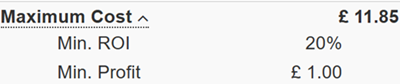
Maximum Cost breakdown in the SellerAmp SAS Profit Calculator panel

  1. If Sale Price less costs prohibit you from achieving the ROI and Profit you entered in the Buying Criteria of your Settings, the Max Cost will be red.
    Fulfilled Max Cost requirement in the Quick Info panel
  2. If Sale Price less costs do allow you to meet both criteria you set, then Max Cost will be green
    Unfulfilled Max Cost requirement in the Quick Info panel
The decision to buy the product is ultimately up to you, SAS is just reminding you of the criteria you configured in Settings.

How we calculate all of these items is...
  1. Max Cost = Sale Price - Min. Profit - Fees - VAT
  2. ROI = Profit / Cost Price
  3. Profit Margin = Profit / Sale Price
*Where VAT is paid on the Sale Price, the Sale Price in this equation refers to a VAT-inclusive amount.
    • Related Articles

    • What does the red colour in Profit and Max Cost mean?

      Within your Settings you can set the high and low parameters for Minimum and Maximum BSR (Best Sellers Rank) percentile, the Minimum Profit amount you seek and the Minimum ROI (return on investment) as a percentage versus your cost. SAS will use ...
    • How does VAT on Cost work in SAS?

      If "VAT on Cost" is set to "Yes", you will need to enter the gross purchase price - if it is set to "No", you will need to enter the net purchase price. By default, VAT on Cost and VAT on Sale will be set to "Yes" on every product listing. VAT on ...
    • How VAT on Sale and VAT on Cost are calculated

      The VAT rate in UK is 20% but applies to net prices, (the total gross price is calculated by adding 20% to the VAT-exclusive price). So you pay VAT on the sale price and can reclaim the VAT paid on the cost; excluding the Amazon's VAT on Fees SAS ...
    • When entering FBM shipping cost, should i input VAT-inclusive or VAT-exclusive ?

      When entering FBM shipping, you need to input a VAT-exclusive FBM Cost figure, as the VAT on Fees section will calculate the VAT that would be added on your courier's invoice. More information on VAT on Fees can be found here.
    • Why do the currencies for my cost price and sale price differ?

      If you see different currencies in the Profit Calculator panel, you may be viewing a listing for one marketplace while your home marketplace is set to another in Settings - an example is below: Here, a user selling in the German marketplace has the ...